

Do you use a two-factor authentication SMS system for your business?
Despite all the benefits digital technologies offer, they bring some threats to our lives and businesses.
Hackers are a big concern for both businesses and individuals because they maliciously steal personal and business information and blackmail us.
One of the most important threats is that hackers break into our accounts on different apps and websites.
Security experts have come up with various ideas to overcome these problems. Using a two-factor authentication SMS is one of the most effective and affordable methods to protect your accounts against hackers.
In this blog post, we’ll explain what 2FA text messages are and how they can increase your business security.
Also, we’ll introduce the 2FA SMS feature of WP SMS to help you add an extra layer of protection to your WooCommerce and WordPress journey.
What Is A 2FA SMS?
As it comes from the name, Two-Factor Authentication (2FA) is an authentication method that requires two distinct factors.
We usually divide security factors into three primary categories:
- Something You Know: Passwords, PINs, or answers to security questions.
- Something You Have: Physical devices like smartphones, tokens, or access cards.
- Something You Are: Biometric data like fingerprints or facial recognition.
When users want to enter their accounts on websites and applications, they have to enter a password. This is the first authentication password. The second one can be sent as an SMS to the phone number they had already verified its ownership.
In other words, a Two-Factor Authentication SMS is a one-time password (OTP) or verification code. In 2FA, you’ll combine something the user knows (password) and something they have (SMS code) to significantly enhance security.
This way, you can be sure that even if an attacker finds the password, they cannot access the mobile phone and the unique SMS code.
Using 2FA is simple for users. Here is the process:
- The user enters her/his credentials (username and password).
- Your system automatically sends a one-time SMS verification code to the user’s registered mobile number.
- The user enters the SMS code and logs in successfully.
Pros and Cons of SMS Two-Factor Authentication
Just like any other security system, 2FA SMS has its benefits and drawbacks. Take a look at the pros and cons of 2FA SMS to see why you need to use it for your business:
Advantages of TFA SMS
1. Mitigates Password Weaknesses
Even if you choose a long and complex password, it’s still vulnerable to various attacks like:
- Brute force
- Phishing
- Credential stuffing
SMS 2FA makes sure that even if your password is stolen, the cybercriminal cannot access your account without the OTP.
This way, you can prevent unauthorized access to your accounts and systems. The authentication code is unique and expires after a few seconds. So it provides an effective safeguard against identity theft.
2. User-Friendly and Accessible
Unlike other forms of two-factor authentication, like emails or biometrics, SMS 2FA is accessible to everyone. Almost all people have a mobile phone with SMS capabilities.
So they can receive SMS 2FA codes without having to install additional apps, purchase hardware tokens, or connect to the internet.
3. Enhanced Security for High-Value Accounts
Businesses usually have high-value accounts that contain sensitive data, financial information, and critical assets.
2FA SMS is essential for these accounts because if a hacker accesses them, you’ll lose everything you’ve worked for.
In Particular, you need to use SMS 2FA for banking platforms, crypto wallets, e-commerce websites, and online financial services.
4. Compliance with Security Standards
Studies show that two-factor authentication using SMS can prevent almost 100% of automated attacks.
This is a high level of standard in the security systems, and that’s why regulatory frameworks and industry leaders encourage the use of 2FA.
When you implement SMS-based Two-Factor Authentication for your business, you’re actually complying with these guidelines. This shows your commitment to your users’ data security, resulting in trust and loyalty.
5. Cost-Effective Solution
Another important benefit of using two-factor authentication SMS is that it’s cost-effective compared to other 2FA methods.
As you know, advanced biometric systems or hardware-based solutions are expensive and many businesses can’t afford them.
On the other hand, SMS 2FA just needs existing mobile infrastructure and an automated SMS platform.
This will reduce the need for significant investments in specialized tools and employing experts to use them.
The following table compares SMS 2FA with other methods:
| Aspect | SMS 2FA | Biometric Systems | Hardware Solutions |
|---|---|---|---|
| Setup Cost | Low | High | Moderate to High |
| Operational Cost | Low | Moderate | Moderate |
| Scalability | High | Limited | Moderate |
| User Accessibility | High | Limited | Limited |
| Overall Investment | Minimal | Significant | Moderate to Significant |
6. Widely Supported by Platforms
Almost all major online platforms support SMS 2FA. For example, email providers, social media networks, trading platforms, and e-commerce websites encourage users to use SMS 2FA. Therefore, you can be sure about its compatibility with existing platforms.
Disadvantages of 2FA SMS
Despite all the benefits of 2FA SMS, it has some disadvantages, like:
1. Vulnerability to SIM Swapping
As SMS 2FA is based on your SIM card, it can be endangered during SIM swapping.
SIM swapping is a type of attack to transfer your phone number to a new SIM card. After swapping, attackers can intercept OTPs and access your account.
2. Dependence on Mobile Networks
As it comes from the name, SMS-based 2FA relies on mobile network connectivity. If your users are in areas with poor reception or if the network is down, they can’t receive the 2FA SMS and therefore, they can’t log in.
3. Potential for Phishing Attacks
Many attackers try using phishing techniques to trick users into revealing OTPs. For example, they create a fake login page and encourage users to enter their SMS code. Then, they can easily use the 2FA code to gain unauthorized access.
4. Delayed or Lost Messages
As you might have experienced, SMS delivery can sometimes be delayed or even fail. In such situations, users might get frustrated after attempting many times.
5. Not the Most Secure 2FA Option
In comparison to app-based authenticators like Google Authenticator or hardware tokens, SMS 2FA is less secure. These tools are not vulnerable to attacks like SIM swapping or SMS interception.
2FA SMS For WordPress & WooCommerce
Now that you’ve become familiar with the importance of SMS 2FA, we want to introduce its specific usage for WordPress and WooCommerce.
Why Use SMS 2FA on WordPress and WooCommerce?
As you know, WordPress and WooCommerce are the most popular platforms among online businesses. WordPress supports more than 40% of all websites in the world, and WooCommerce is used by more than 6 million websites.
As a result, they’re prime targets for cyberattacks because they can steal personal data, use financial information, and blackmail business owners.
Here are some reasons why 2FA SMS is required for WordPress and WooCommerce:
- Protection Against Brute Force Attacks: Hackers usually use brute force attacks to attempt to gain access to WordPress admin accounts. SMS 2FA can easily prevent this because even if your admin password is guessed, your account remains secure.
- Safeguards Customer Data: WooCommerce stores save a huge amount of customer data, which is a valuable asset. If hackers access this asset, you’ll lose almost everything. SMS 2FA helps prevent unauthorized access to sensitive customer information.
- Builds Trust: When you use SMS 2FA, you’re actually demonstrating your commitment to customers’ security. This way, you can enhance user trust and confidence in your platform.
- Regulatory Compliance: Using a strong authentication system is a must for your business if you want to comply with data protection regulations like GDPR. Fortunately, SMS 2FA complies with these requirements.
- User-Friendly Implementation: WordPress plugins like WP SMS simplify the SMS 2FA setup process. So you can offer a high-level security system to your users without extensive technical knowledge.
- Improved Security for All User Roles: Using SMS 2FA, you can enhance the security of all users from administrators and editors, to customers.
How to Implement SMS 2FA on WordPress and WooCommerce
Thanks to advanced SMS plugins like WP SMS, you can easily integrate SMS-based Two-Factor Authentication into your WordPress and WooCommerce.
WP SMS is one of the best SMS plugins for WordPress that offers lots of advanced features like automation, segmentation, dynamic content, WooCommerce order updates, and two-factor authentication SMS.
Here’s a step-by-step guide:
- Install and Activate the Plugin: Log in to your WordPress dashboard. Then, go to the “Plugins” section and search for WP SMS. Now, you can easily install and activate the plugin.
- Purchase WP SMS Pro: Although WP SMS offers a free plan, the 2FA feature is offered in the paid plan. So choose and buy a plan to get started.
- Customize User Roles and Permissions: Now, you can go to the WP SMS dashboard and customize the 2FA feature. For example, specify which user roles are required to use SMS 2FA. You can also determine a dynamic content template and include personalized items in it.
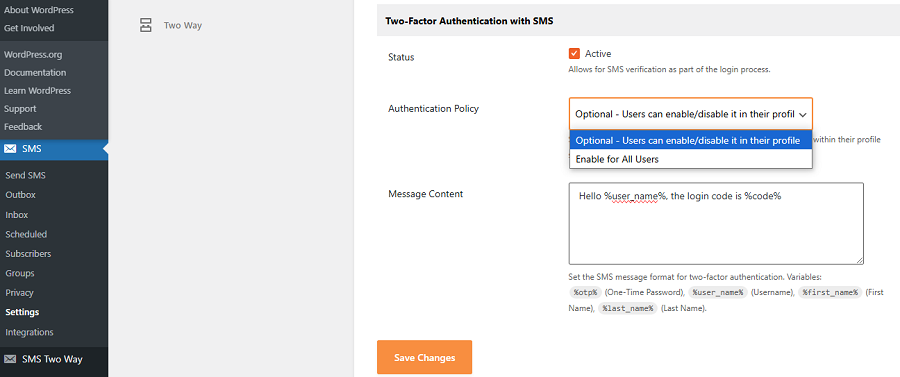
- Test the Setup: Perform several test logins to make sure SMS 2FA is working correctly.
Conclusion
If you’re an online service, you need to think of the security of your business information and also your customers’ data. One of the best methods to ensure the safety of accounts on your website is by using two-factor authentication SMS. This is a simple and effective way that prevents unauthorized access even if the password is stolen.
WP SMS offers an affordable and easy-to-use option to implement 2FA SMS on your WordPress website and WooCommerce accounts. You just need to install the plugin and activate the 2FA SMS feature.
Don’t worry if you have any questions about implementing two-factor authentication SMS, because our responsive team will support you.
FAQs
What is a two-factor authentication SMS?
2FA SMS is a secure way to access an account using two different factors. The first factor is the password, and the second one is a code that is sent via SMS.
What Are the Types of Authentication Methods?
Here are the different types of authentication methods:
1. Single-Factor Authentication (SFA): It just needs one factor that is usually something the user knows like a password.
2. Two-Factor Authentication (2FA): It needs two separate forms of verification that are from different authentication factor categories. For example, something you know (password) and something you have (smart card).
3. Multi-Factor Authentication (MFA): It adds extra layers of security by requiring two or more security factors.
4. Three-Factor Authentication (3FA): It needs three separate forms of verification for maximum security. It usually involves something the user knows, something the user possesses, and something inherent to the user, such as a fingerprint scan.
What are the different types of 2FA?
Here are various types of 2FA:
– SMS-based Authentication
– Authenticator Apps
– Email-based Verification
– Hardware Tokens
– Biometric Authentication
– Push Notifications
– Knowledge-based Verification
– Location-based Authentication
Why is SMS 2FA bad?
The most important weakness of 2FA is that your cell phone might be stolen. Then, they can access all of your applications and bank accounts because the SMS is sent to the same phone number.
Is SMS 2FA better than Totp?
SMS-based 2FA is easier to set up and use. However, SMS 2FA is not as secure as TOTP.