

All you need to know about SMS delivery failures troubleshooting.
SMS is a fast and reliable communication channel and is widely used by both individuals and businesses. Surprisingly, SMS has an open rate of 98%, which is higher than any other communication method.
However, sometimes your messages might face delivery failures due to several reasons. In this blog post, we’ll explain why these SMS delivery failures happen and how you can fix them.
What Are SMS Delivery Failures?
An SMS delivery failure means your message doesn’t reach the recipient.
When you send an SMS, it must go through a series of systems:
- Your SMS application/website sends the message to an SMS gateway provider.
- The SMS gateway forwards the message to a mobile carrier for delivery.
- Depending on the destination, the message may pass through multiple carriers.
- The message then reaches the recipient’s mobile network.
- Finally, the recipient’s device receives the SMS.
You might receive a status message, like:
- Delivered: This message means that the carrier confirms that the message has reached the recipient’s device. This is usually triggered by a DLR (Delivery Receipt) from the receiving carrier.
- Undelivered: When the carrier can’t deliver the message, it shows this status.
- Failed: Sometimes, your messages can’t even be sent. This is the opposite of the “Sent” status.
Remember that not all carriers provide DLRs. Also, some carriers only report partial statuses.
Overall, SMS delivery depends on multiple factors, including devices, carriers, and international regulations. Any small problem in each of these factors might lead to SMS delivery failure.
Common Reasons for SMS Delivery Failure
If you want to troubleshoot SMS delivery issues, you must first go for the most common failures.
Here is a list of the most frequent reasons why your messages are not delivered:
1. Carrier Routing Issues
Carriers are the most important parties in the SMS delivery process. So, when a carrier can’t properly transfer a message to another one, your message may face delivery failure.
This problem especially happens across countries or networks. Other technical problems at the carrier level are:
- Temporary outages
- Routing misconfigurations
- Congestion in the network
These issues can block messages. You can’t do anything about these problems because they should be solved by experts working in that organization.
2. Message Formatting and Encoding Errors
If you have the wrong text encoding in your messages, you’ll face delivery issues. Remember that standard GSM-7 (Global System for Mobile) only supports basic characters. Moreover, it just allows you to include 160 characters per message.
If you use emojis or non-Latin words in your messages, the encoding will switch to UCS-2. In this situation, the limit will be 70 characters. It sometimes causes message segmentation or rejection.
| Encoding | Character Set | Max Length | Used For | Common Issues |
| GSM-7 | Latin letters, numbers, basic symbols | 160 | English text | Split messages |
| UCS-2 | Emojis, accented, non-Latin | 70 | Multilingual text | Short limit, encoding errors |
| Concatenated | Multi-part GSM-7/UCS-2 | Variable | Long messages | Delivery errors, dropped parts |
3. Blacklisted or Invalid Numbers
One of the most important matters in SMS marketing is to respect the opt-out requests of subscribers.
If you don’t remove them from your contact list, you might face legal fines. Also, users might block your number, leading to a delivery failure. Moreover, the number might be inactive or invalid, so the message will fail silently.
4. Invalid Sender IDs
If you’re running an international campaign, you must know the Sender ID rules them. Take a look at the following table to prevent failures caused by invalid sender IDs:
| Region / Country | Allowed Type | Key Rules | Common Issues |
| U.S. | Numeric (10DLC) | A2P registration required | Unregistered IDs blocked |
| Canada | Numeric / Short Code | Carrier approval needed | Unverified IDs filtered |
| U.K. | Alphanumeric | Must show a clear brand | Generic IDs rejected |
| India | Alphanumeric | DLT registration required | Unapproved IDs rejected |
| Australia | Alphanumeric / Short Code | Must be traceable | Suspicious IDs blocked |
| Middle East | Mostly Numeric | Alphanumeric restricted | Unregistered IDs blocked |
| Africa | Numeric | Varies by carrier | Masked IDs filtered |
5. Content Filtering and Compliance Rules
Each country has strict rules about the content you can send via SMS. As a result, carriers use filters to block spam, phishing attempts, or illegal content. So, if you use noncompliant messages, you’ll increase the risk of throttling or blocking.
6. Device-Level Problems
If everything upstream is working, the problem is definitely from your device. Common examples include:
- Your device is turned off.
- You are out of coverage range.
- The device’s inbox is full.
- The phone is in Do Not Disturb mode.
- The Airplane mode is on.
- Your SMS subscription has expired.
- The SIM card has been deactivated.
How to Troubleshoot SMS Delivery Failures
When your messages are not delivered, you have to start diagnosing and fixing the problem for the most probable reason.
Here is how:
1. Start with Logs and Delivery Reports
The logs of your SMS provider are the first thing you have to check. Try to examine delivery reports for status codes: “Delivered,” “Undelivered,” or “Failed.”
Reputable providers, like Twilio and Nexmo, give you granular details, including error codes and timestamps.
Using these codes, you can recognize where the issue comes from. It can be your system, the carrier, or the recipient’s network.
2. Verify API Responses
If you’re using an API to send SMS, you have to check the HTTP response codes and message SIDs.
Remember that a successful API response, like HTTP 200, only means the provider accepted the message.
So, you can’t interpret that as a delivered message. You’ll need to check the message status endpoints to confirm delivery outcomes.
3. Test Valid Numbers
You must check the SMS delivery by sending test messages to numbers that you’re sure about.
The numbers must be active and verified so that you can check them across different carriers.
If only certain carriers or regions cause failures, you can be sure about routing or compliance issues. Otherwise, you have to find a system configuration problem.
4. Review Message Content and Formatting
Now, you have to check your messages, including:
- Special characters
- URLs
- Excessive length
Try to examine the message with plain text and avoid unnecessary symbols to see if it’s delivered.
5. Examine Sender IDs and Compliance Settings
If you recently changed your sender ID, you must make sure that it’s registered. Also, you need to see if it’s allowed in the destination country.
For example, in the U.S. and Canada, you must use 10DLC or an approved short code. Also, for international traffic, you can only use alphanumerics in a country that allows you to do that.
6. Analyze Provider Dashboards
Many SMS platforms include analytics dashboards that show items, like:
- Delivery rates
- Latencies
- Error breakdowns
You can use these insights to find problems.
7. Implement Developer Safeguards
In your application logic:
- Add retry mechanisms for transient errors.
- Use message queuing to prevent overloads.
- Set up fallback channels such as email, WhatsApp, or push notifications for critical communications.
- Build a test environment with sandbox credentials to replicate issues safely.
These steps help isolate the problem without impacting live users.
Troubleshooting SMS Delivery in WordPress
WP SMS is one of the best SMS marketing platforms that allows you to send text messages directly from your WordPress website.
It supports more than 350 SMS gateways and offers useful features like automation, scheduling, segmentation, etc.
It’s a reliable SMS tool that connects your website to SMS gateways and makes sure that your customers receive timely notifications.
WP SMS hardly faces troubles, but if you face failures in your SMS campaigns, we’ll help you understand the reason.
Here is how:
How WP SMS Sends Messages
First, let’s see what WP SMS does.
It’s important to know that WP SMS doesn’t deliver messages itself. Actually, it’s like a bridge between your WordPress dashboard and an SMS gateway provider.
When you schedule a message on WP SMS manually or trigger an automated SMS, it sends the message to the SMS gateway.
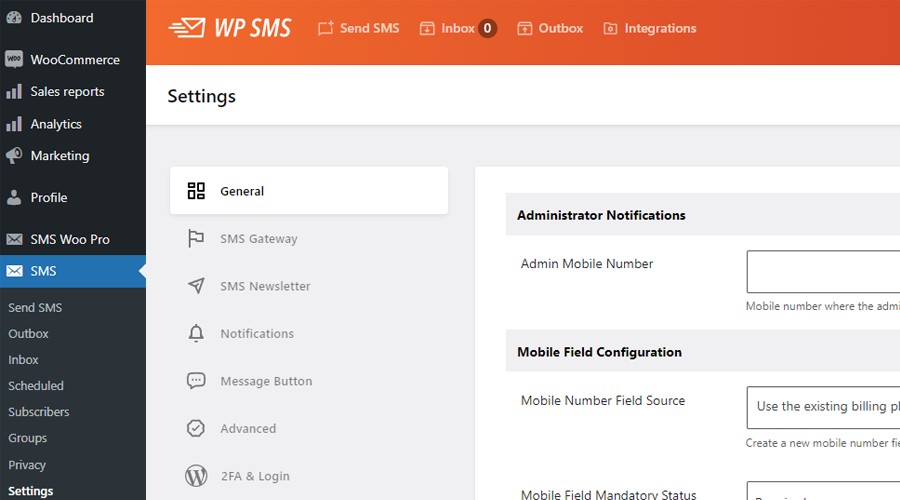
After that, the gateway handles carrier routing, message delivery, and reporting. So, when SMS delivery fails, the issue might come from the plugin’s settings, your gateway account, or the carrier network.
Common WP SMS Misconfigurations
Here are some of the most frequent setup problems that might cause SMS delivery problems when working with WP SMS:
- Incorrect API Credentials: Even a single typo in your API key, sender ID, or secret token can cause invalid requests. So, try to copy credentials directly from your SMS provider’s dashboard.
- Test or Sandbox Mode: Many gateways have sandbox environments for testing. Make sure that your WP SMS integration does not point to a sandbox API.
- Outdated Plugin or Gateway Settings: When a new update of the WP SMS plugin or your chosen gateway comes out, older configurations might stop working. So, make sure that you are using the latest versions of both the plugin and the SMS gateway.
Best Practices for Reliable Delivery in WP SMS
To prevent delivery failures in your SMS campaigns, it’s good to consider the following tips:
- Make sure that you’re using verified, compliant sender IDs that are approved by your SMS gateway.
- Always keep your gateway API credentials secure and up to date.
- Before using emojis or other special symbols, make sure that your SMS gateway provider supports them. Otherwise, use plain text to prevent formatting issues in SMS delivery.
- Check HTTPS on your site because some gateways reject unencrypted HTTP callbacks.
Last but not least, you can always contact the WP SMS support team to get help if you face delivery issues.
Final Thoughts
SMS has a high open and response rate, making it a great channel for fast and short communications.
However, sometimes you might face delivery issues from the SMS gateway, mobile carriers, devices, and API configurations. In this blog post, we presented an SMS delivery troubleshooting guide to help you diagnose and fix these problems.
It’s good to look at the following table to find your delivery issue and try to fix it:
| Failure Category | Error | Cause | Fix |
| User / Number Issue | Delivery failed | Invalid or unreachable number | Check number format |
| Handset unreachable | Phone off or out of range | Retry later | |
| Unknown handset | Invalid or disconnected number | Update list | |
| Landline number | SMS not supported | Use mobile only | |
| Carrier / Compliance Issue | Message blocked | User or carrier blocked the sender | Use the approved sender ID |
| Carrier filter | Spam or content violation | Adjust message content | |
| Routing error | Carrier path unavailable | Escalate to the provider | |
| System / Throughput Issue | Queue overflow | Sending too many messages | Slow send rate |
| Invalid parameters | Incorrect API data | Check request fields | |
| Auth failure | Invalid credentials | Verify API key | |
| Provider / Server Issue | Server error | Gateway downtime | Retry later |
| Unknown / Temporary Issue | Unknown error | Carrier or system fault | Retry or contact support |
Of course, you can always count on our help if you can’t fix the delivery issue yourself.
FAQs
Why is my SMS failing to deliver?
It usually means the number is invalid, blocked, or the carrier rejected your message due to routing or content issues.
How do I fix SMS receiving problems?
Check network signal, storage space, and message blocking settings. If others can’t reach you, contact your carrier.
How to fix the message send failure?
Verify the recipient’s number, ensure you have coverage and credits, and confirm your SMS gateway or plugin settings.
Why is my SMS delivery report unsuccessful?
The carrier didn’t confirm delivery. It’s possibly due to handset unavailability, DND mode, or network congestion.
How to enable SMS delivery reports?
In your SMS app or platform, enable “Delivery Reports” under message settings, or activate status callbacks in your API/gateway dashboard.